Here is a case study example for calculating mileage using the principle of compensation:
My tenant has configured the following URSSAF scale on its Expensya account
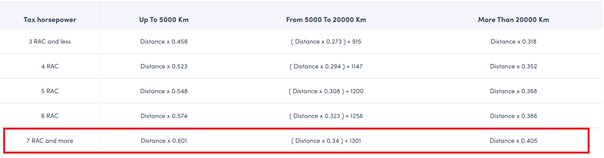
- I entered mileage in Expensya using a vehicle with a taxable horsepower of 7HP.
A first trip totalling 1,000 miles "trip 1"
- New cumulative distance = 1,000 miles
- The sum of all my other mileage = 0, because I have yet to enter any mileage with this vehicle.
- The formula to be applied is "up to 5,000 miles"
- Value to be reimbursed = (New Cumulative Distance x 0.601) – (The sum of all my other mileage) = (1,000 x 0.601) - 0 = €601
A trip totalling 2,000 miles "trip 2"
- New cumulative distance = 1,000 + 2,000 = 3,000
- The sum of all my other mileage = 601€
- The formula to be applied is "up to 5000 miles"
- Value to be reimbursed = (New Cumulative Distance x 0.601) – (The sum of all my other mileage) = ((1,000 + 2,000) x 0.601) - 601 = €1202
A trip totalling 3,000 miles "trip 3"
- New cumulative distance = 1,000 + 2,000 + 3,000 = 6,000
- The sum of all my other mileage= 601 + 1,202 = €1,803
- The formula to be applied is "From 5,000 to 20,000 miles" = (distance x 0.34) + 1,301
- Value to be reimbursed = ((New Cumulative Distance x 0.34) – (The sum of all my other mileage) = ((6,000 x 0.34) + 1,301) - 1,803 = €1,538
- I then deleted "journey 2" which totalled 2,000 miles
Remaining on my Expensya account is:
- Cumulative distance = 1,000 + 3,000 = 4,000 miles
- Total sum of all my mileage = 601 + 1,538 = €2,139
- I add a “journey 4” mileage totalling 500 miles
- New cumulative distance = 4000 + 500 = 4500 miles
- The sum of all my other mileage = €2139
- The formula to be applied is "up to 5,000 miles” = (distance x 0.601)
- Value to be reimbursed = ((New Cumulative Distance x 0.601) – (The sum of all my other mileage ) = (4,500 x 0.601) - 2,139 = €565.50
- I now remove the “trip 4” and “trip 4” associated mileage
- So, I now only have mileage left for “trip 3”.
- New cumulative distance = 3,000 miles
- The sum of all my other mileage = €1,538
- In the list of mileage, I can see that "trip 3" has a value of €1,538; I click on it to make modifications and see that the value changes - why is this?
- When initiating a mileage in Expensya, the system recalculates the value to align with the latest adjustments, taking into account the historical changes in other mileage. For instance, if a mileage has been removed, it is essential to review and potentially update the value accordingly.
- The calculation is changed as follows:
- New cumulative distance = 0 miles (because my "trip 3" is being edited) and the other routes (1, 2 and 4) have been deleted
- The sum of all my other mileage = €0 (because my only trip is in the process of being edited)
- The formula to be applied is "up to 5,000 miles” = (distance x 0.601)
- Value to be reimbursed = (Cumulative Distance x 0.601) – (The sum of all my other mileage) = (3000 x 0.601) – 0 = €1,803
- The value has changed
If I save, the amounts are updated in Expensya, otherwise, compensation is applied to the next mileage that is entered.
Was this article helpful?
That’s Great!
Thank you for your feedback
Sorry! We couldn't be helpful
Thank you for your feedback
Feedback sent
We appreciate your effort and will try to fix the article