Categories can now be added to Expensya via an import file, which is easy to fill in and quick to integrate.
Simply :
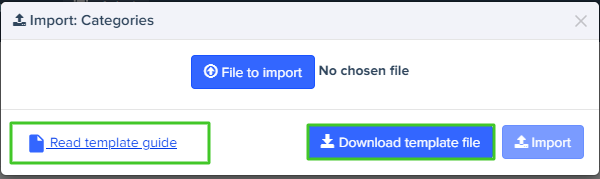
- Go to the categories page on the Admin tab
- Click on the Import button
- Download the template file and documentation
To achieve this:
- Access the categories page in the Administration Menu.
- Click on the Import button.
Use the following information to fill in the columns "O" and "L"
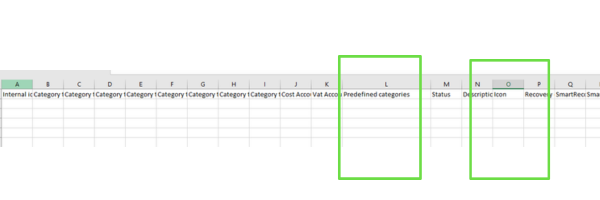
Here's the list of predefined categories you'll need to fill in column L on the category import file:
"Food, Cafe, Restaurant, Bar, Train, Bus, Metro, Taxi, Flight, Toll, Car, Rentalcar, Parking, Hotel, Health, Lodging, Phone, Entertainment, Movies, Bowling, Concert, Services, Equipment, Supplies, Misc, Fuel, Fueldiesel, Water, Gas, Net, Power, Rent, Mileage, Books, Conference, Admin, Post, Boat, Fuelgpl, Travelbookingfee, Bank, Perdiem, Flatrate, Bike"
Here's the list of icons you'll need to fill in column O on the category import file:
 | Admin |
 | Boat |
 | Books |
 | Conference |
 | Car |
 | Rentalcar |
 | Commodity |
 | Drugstore |
 | Power |
 | Entertainment |
 | Equipement |
 | Flight |
 | Fuel |
 | Fueldiesel |
 | Furniture |
 | Gas |
 | Gift |
 | Insurance |
 | Net |
 | Hotel |
 | Magazine |
 | Restaurant |
 | Metro |
 | Misc |
 | Parking |
 | Phone |
 | Post |
 | Printing |
 | Rent |
 | Services |
 | Stamp |
 | Supplies |
 | Taxi |
 | Train |
 | Toll |
 | Water |
 | Mileage |
 | Fuelgpl |
 | Perdiem |
 | Bike |
| Equipement |
Was this article helpful?
That’s Great!
Thank you for your feedback
Sorry! We couldn't be helpful
Thank you for your feedback
Feedback sent
We appreciate your effort and will try to fix the article