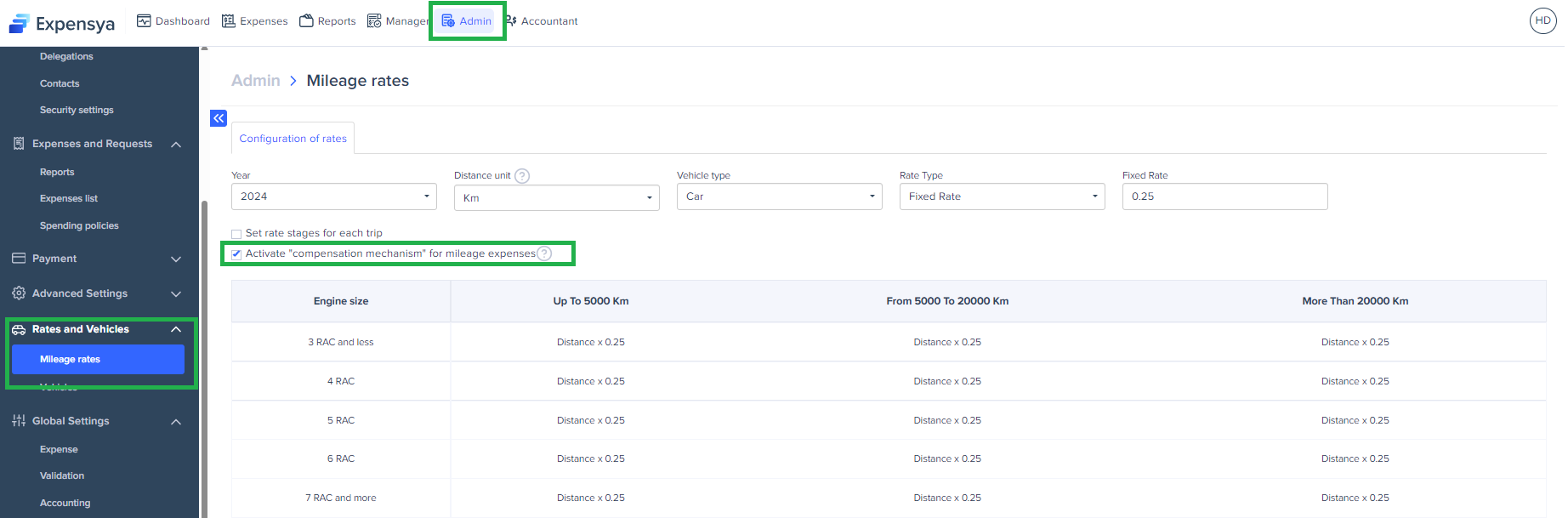
If you do not want automatic compensation for mileage allowances to take place, we invite you as the administrator of your tenant on Expensya to deactivate it as follows:
- In the Admin tab
- Click on Rates and Vehicles then Mileage rates.
- On the page that is displayed, uncheck the box Activate "compensation mechanism" for mileage expenses
Note: Please note that compensation occurs when any change in your scale can influence the value of your future bills, potentially resulting in a balance of zero until compensation is made for past overpayments.
Note: Here's how "compensation" operates: Expensya will adjust upcoming mileage to account for the difference between the old rate and the new rate. Consequently, in the event of a substantial change, certain forthcoming mileage may show a value of 0 as part of the compensation process.
- Confirm by checking I understand the consequences of these changes and save
Was this article helpful?
That’s Great!
Thank you for your feedback
Sorry! We couldn't be helpful
Thank you for your feedback
Feedback sent
We appreciate your effort and will try to fix the article