The invoice and receipt translation feature in Expensya makes it easier for users with foreign-language invoices/receipts to manage their expenses.
When scanning an invoice in a foreign language, Expensya allows the user to translate it into the language of their account by simply clicking on the translation button.
Note: This new feature is available by default for all user types.
Warning: It is important to note that the translation is automated, so it is possible that there are errors or inconsistencies in the translation. It is recommended to check the translations before validating them.
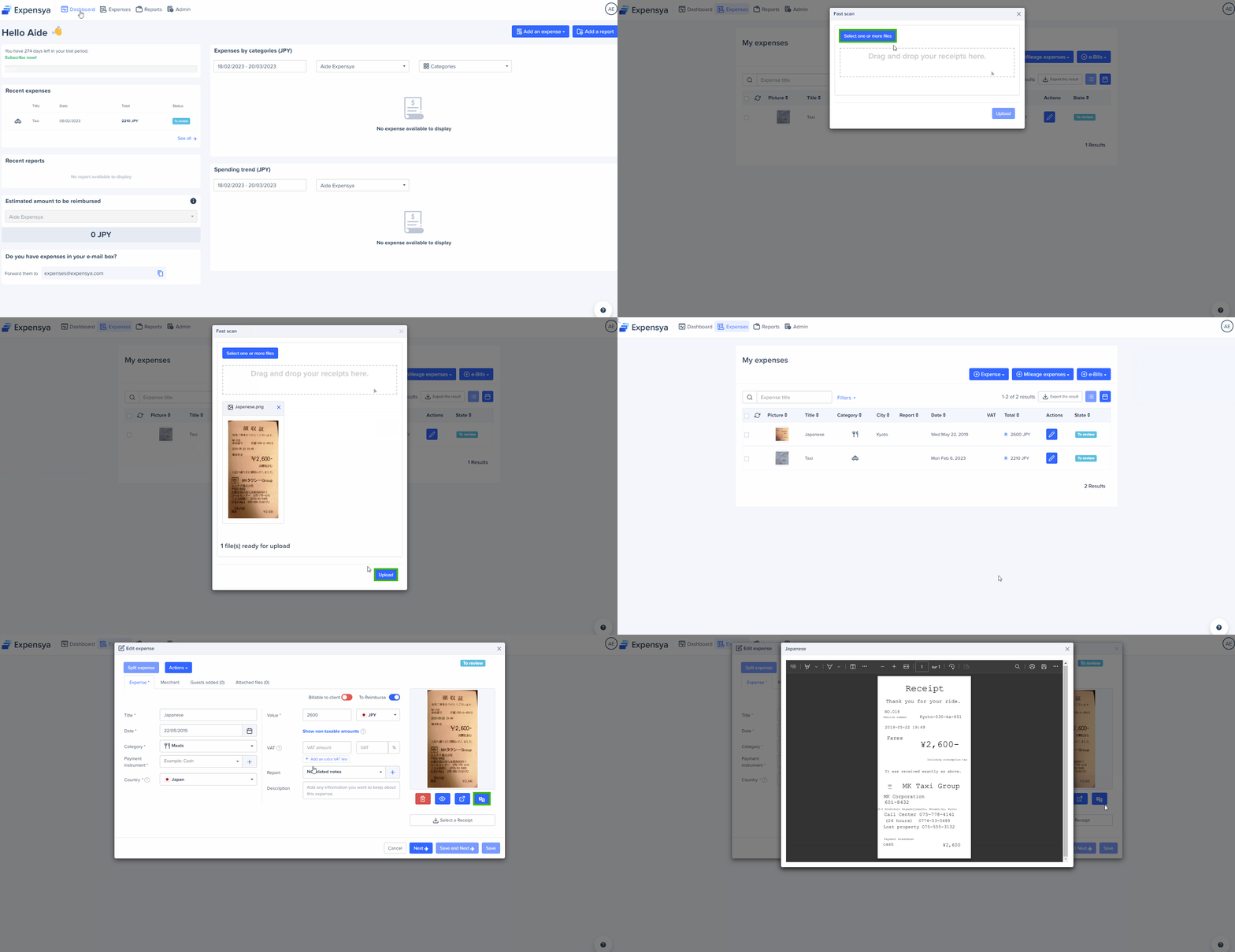
To translate your scanned invoices via Fast Scan:
- Go to the Expenses tab.
- Click on + Expenses, then on Fast Scan.
- Upload the receipt with the foreign language content.
- Once the expense is added, click on it
- View the translated invoice via the button below its preview View translated receipt.
Was this article helpful?
That’s Great!
Thank you for your feedback
Sorry! We couldn't be helpful
Thank you for your feedback
Feedback sent
We appreciate your effort and will try to fix the article