To request a physical Expensya card for an employee:
- The company should have already completed the onboarding process. For more details: Expensya cards - Account management
- The administrator should have the Can manage cards payment role, you. For more details: Expensya Cards - Administrator Role Management
- The employee should already have an enabled virtual Expensya card. For more details: How to provide virtual Expensya card(s) to employee(s)?
You can follow the following steps:
- As an Admin with the Can manage cards payment role, browse to the Payment Instruments section under the Payment menu, and view the list of Expensya cards under the Expensya cards tab.
- To request a physical Expensya card, choose an employee with an enabled virtual card and click on “order the card” button and fill in the address where the physical card will be delivered:
- Address: building number and street name
- City
- Country
- Zip Code
Note: You may request only one physical Expensya card per employee.
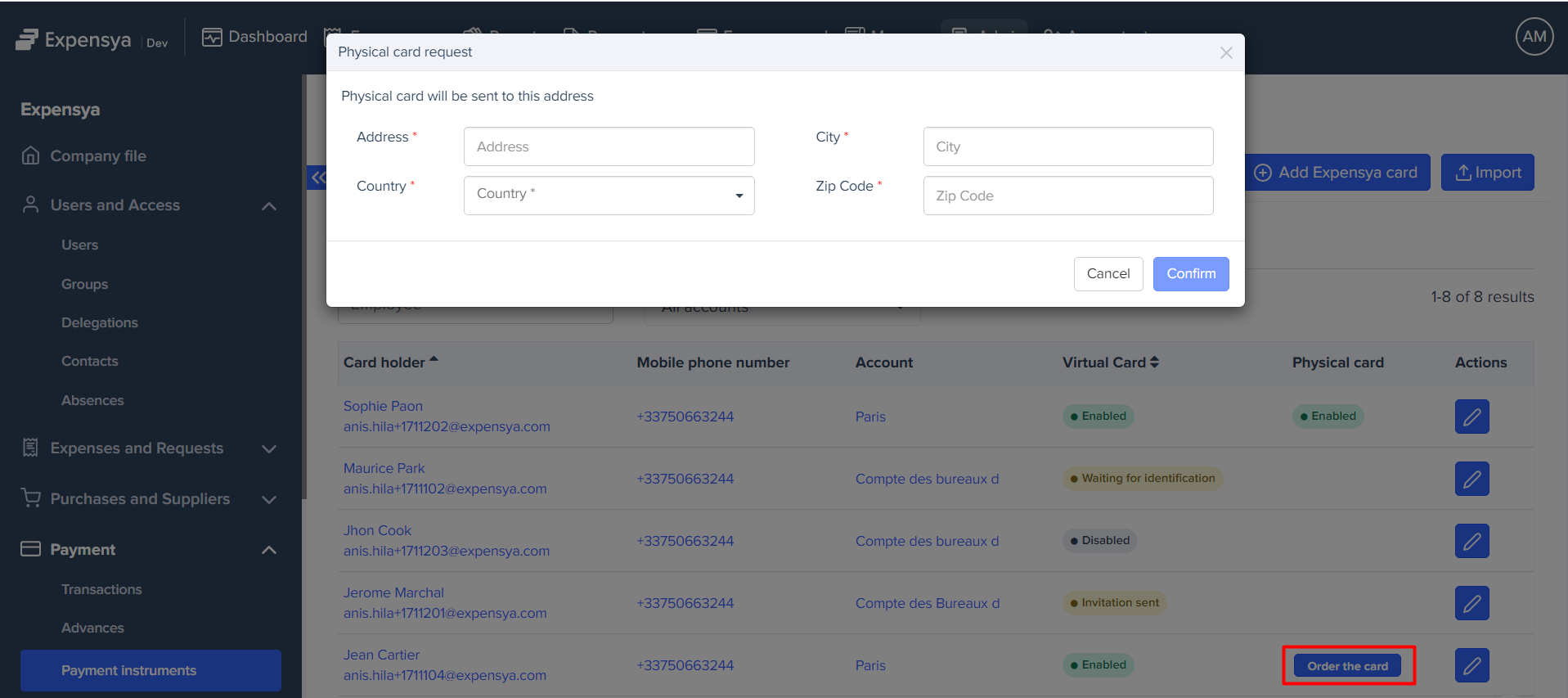
- Click on the Confirm button.
- The admin will need to provide consent through an SMS authentication operation.
- The physical Expensya card will be displayed within 72 hours into the Expensya cards list under Expensya cards tab with an To Activate status.
- The card will be physically delivered to the employee's provided address.
Was this article helpful?
That’s Great!
Thank you for your feedback
Sorry! We couldn't be helpful
Thank you for your feedback
Feedback sent
We appreciate your effort and will try to fix the article