To disable an Expensya card :
- The tenant's admin should have an enabled payment account. For more details Expensya cards - Account management
- The administrator should have the “Can manage cards” payment role. For more details: Expensya Cards - Administrator Role Management
- The employee should already have an enabled virtual Expensya card. For more details : How to provide virtual Expensya card(s) to employee(s) ?
You can follow the steps listed below:
Disable Expensya card:
- As an Admin with the Can manage cards payment role, browse to the Payment Instruments section under the Payment menu, and view the list of Expensya cards under the Expensya cards tab.
- Select a virtual Expensya card with an Enabled status then click on Disable this card button.
- A confirmation screen will be displayed. Click on the Disable button* to confirm.
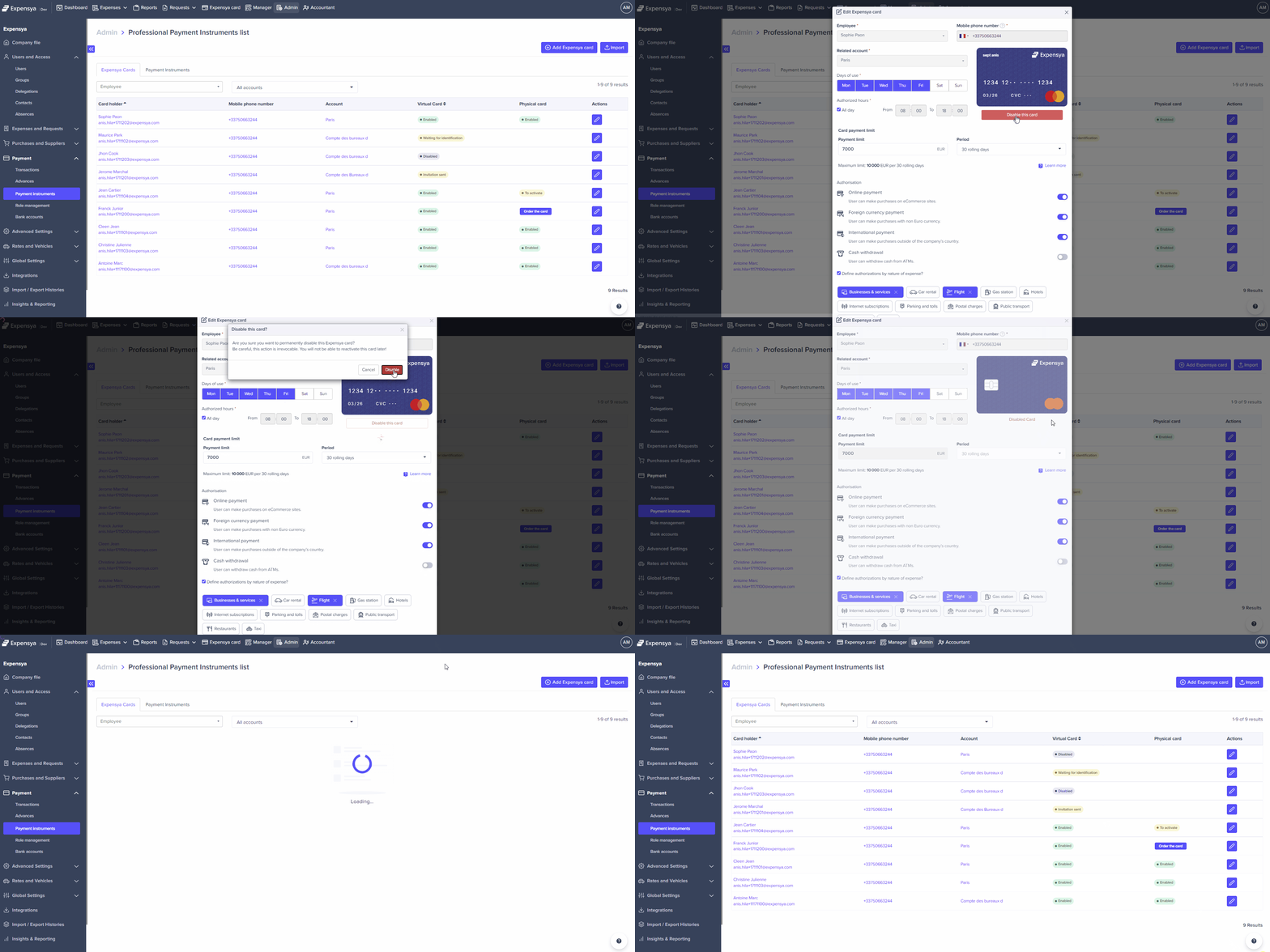
Note: *The Expensya card will be permanently disabled and cannot be reactivated. To provide an Expensya card to the same employee, you will need to issue a new Expensya card. For more details How to provide virtual Expensya card(s) to employee(s) ?
Warning: By disabling the Expensya card, both the virtual and physical cards will be deactivated.
Was this article helpful?
That’s Great!
Thank you for your feedback
Sorry! We couldn't be helpful
Thank you for your feedback
Feedback sent
We appreciate your effort and will try to fix the article