Explanation of Mileage Calculation in Expensya
Expensya uses the Google Maps API to calculate distances traveled. This integration allows Expensya to automatically provide accurate mileage calculations for your business trips.
Why Has the Route Changed?
The Google Maps API always suggests the shortest route for a given journey. As a result, the recommended route may change based on updates and optimizations made by Google Maps. Expensya does not have the ability to modify or influence the route suggested by Google Maps.
Correct Use of Addresses
To ensure accurate recognition by the Google Maps API, it is crucial to use addresses exactly as they appear on Google Maps. Here are some tips for entering your addresses accurately:
- Check Spelling and Details: Ensure that all information (street number, street name, city, etc.) is correct and complete.
- Use Google Maps Suggestions: When entering an address, use the suggestions provided by Google Maps to ensure the address is correctly recognized.
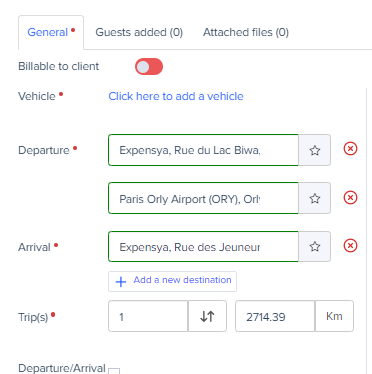
Adding waypoints:
- When entering your starting and ending points, click on Add a new destination.
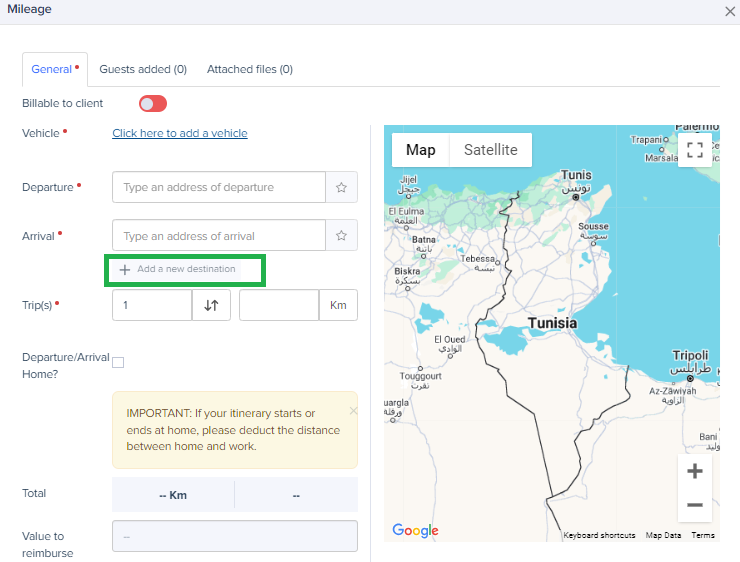
- Add the waypoints you wish to include in your route.
Was this article helpful?
That’s Great!
Thank you for your feedback
Sorry! We couldn't be helpful
Thank you for your feedback
Feedback sent
We appreciate your effort and will try to fix the article