Warning: QuickBooks is no longer available in France.
Before starting, it is important to understand the concept of reports on Expensya. Reports are expense boxes, which allow you to classify expenses by mission, week, month, location and then generate an expense report.
Note: The report must be 'Archived' for it to be exported on Quickbooks
You can export your archived reports from Expensya to QuickBooks by following these steps:
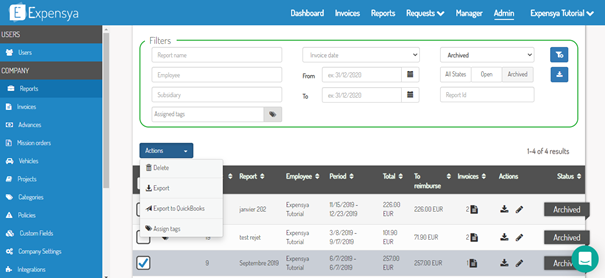
From the admin tab, go to reports on the sidebar menu. Tick the archived reports you wish to export, then on actions 'Export de QuickBooks'.
Was this article helpful?
That’s Great!
Thank you for your feedback
Sorry! We couldn't be helpful
Thank you for your feedback
Feedback sent
We appreciate your effort and will try to fix the article