What is an Accounting Period?
The accounting period, also known as a fiscal year, is the duration during which a company's financial transactions are recorded and consolidated. It can cover a month, a quarter, or a year, depending on the company's preferences. The end date of the accounting period marks its closure and holds great significance for preparing a comprehensive financial overview. This facilitates accurate reporting, evaluation of financial performance, and informed decision-making.
A defined end date helps maintain financial compliance and ensures accurate bookkeeping.
By setting an end date, you define the period within which you will collect and record your expenses. This could align with the end of a month or quarter, for instance.
Furthermore, this end date is crucial for maintaining accurate and compliant accounting. When you clearly define the period, you avoid double counting errors and make it easier to balance your accounts.
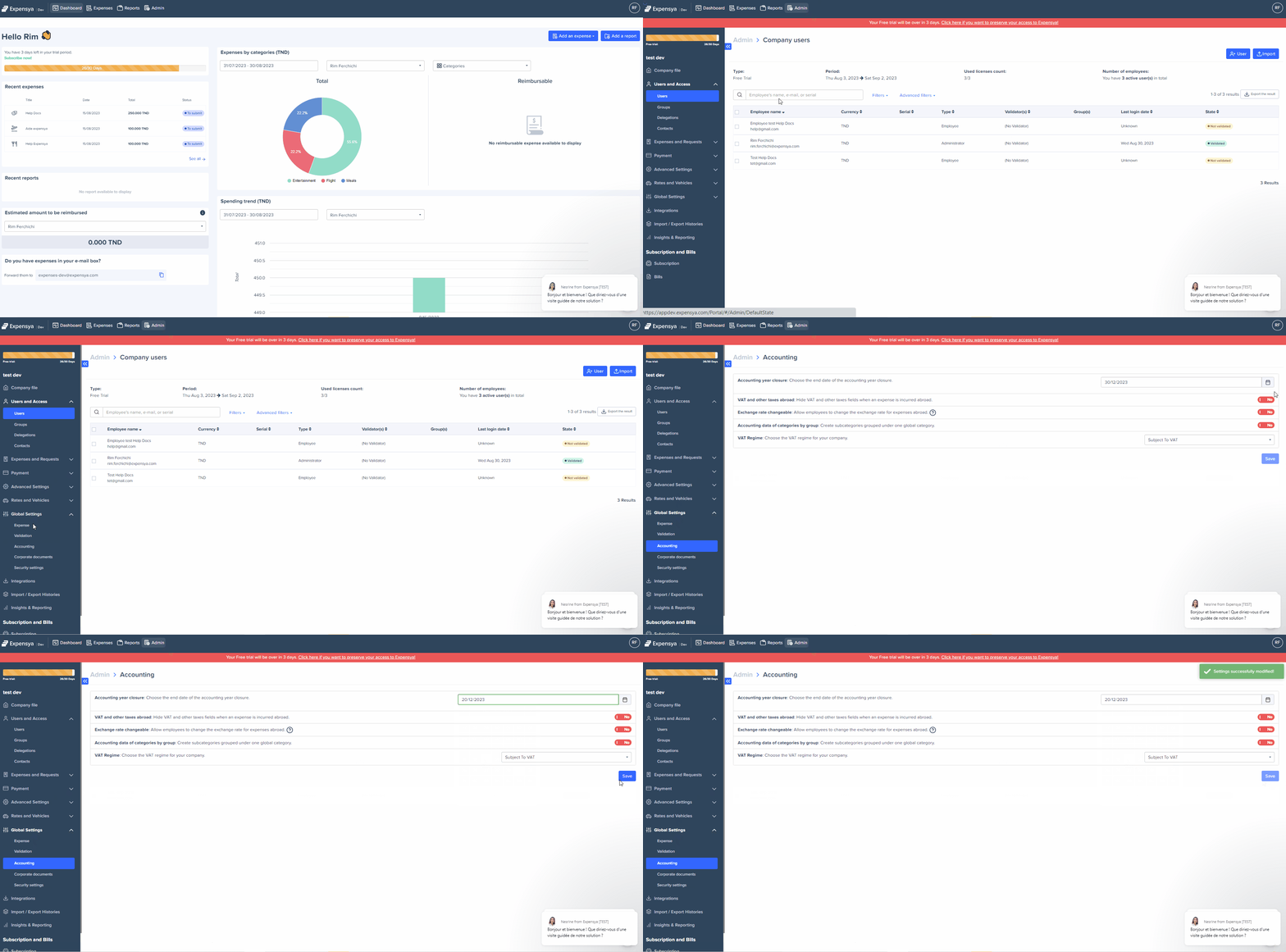
Follow these steps to add an end date to the accounting period:
- Go to the Admin tab.
- Click on Global Settings > Accounting.
- Set the end date of the accounting period.
- Click Save.
Was this article helpful?
That’s Great!
Thank you for your feedback
Sorry! We couldn't be helpful
Thank you for your feedback
Feedback sent
We appreciate your effort and will try to fix the article