Steps to activate your Expensya card :
In order to start using Expensya cards, the legal representative* or the company's representative must open a payment account with Swan, Expensya's partner.
An administrator profile is required for the company's legal representative or agent. His/her email address will be configured to receive the email to start the process.
If you start the account opening process, the steps are as follows:
- Read the Expensya Cards: Register your company now email, click on the Register my company button and fill in the company details.
- Read the We need to verify your identity email, click on the Prove my identity button and fill in your personal data
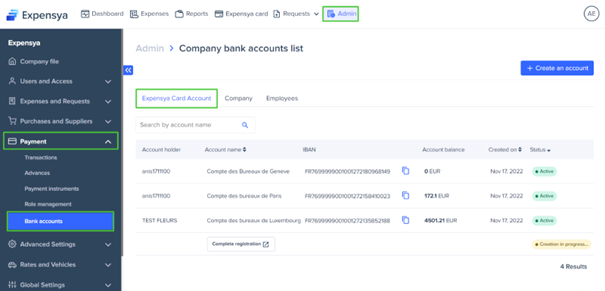
- Navigate to Admin, then to the Payment menu
- Go to the Bank Accounts submenu
- Select the Expensya Card Account tab; the company's account will be displayed in the list.
Consultation of the list of Expensya card accounts :
An administrator who has the role** View Accounts can access the list of Expensya card accounts. If you wish to consult this list:
- Navigate to the Admin section, then select the Payment menu.
- Go to the Bank Accounts submenu.
- In the Expensya Card Accounts tab, the list of company accounts will be displayed.
The administrator then has the option to :
- Search for a payment account by account name
- Copy the IBAN of the payment account to be able to fund it from another bank account.
- View your account balance in real time
- Consult the date of creation of the account
- View account status
Viewing the account details of Expensya cards :
An administrator who has the role View Accounts can access the account details of Expensya cards. If you wish to view the account details:
- Navigate to the Admin section, then select the Payment menu
- Go to the Bank Accounts submenu
- Select the Expensya Card Account tab, the list of company accounts will be displayed.
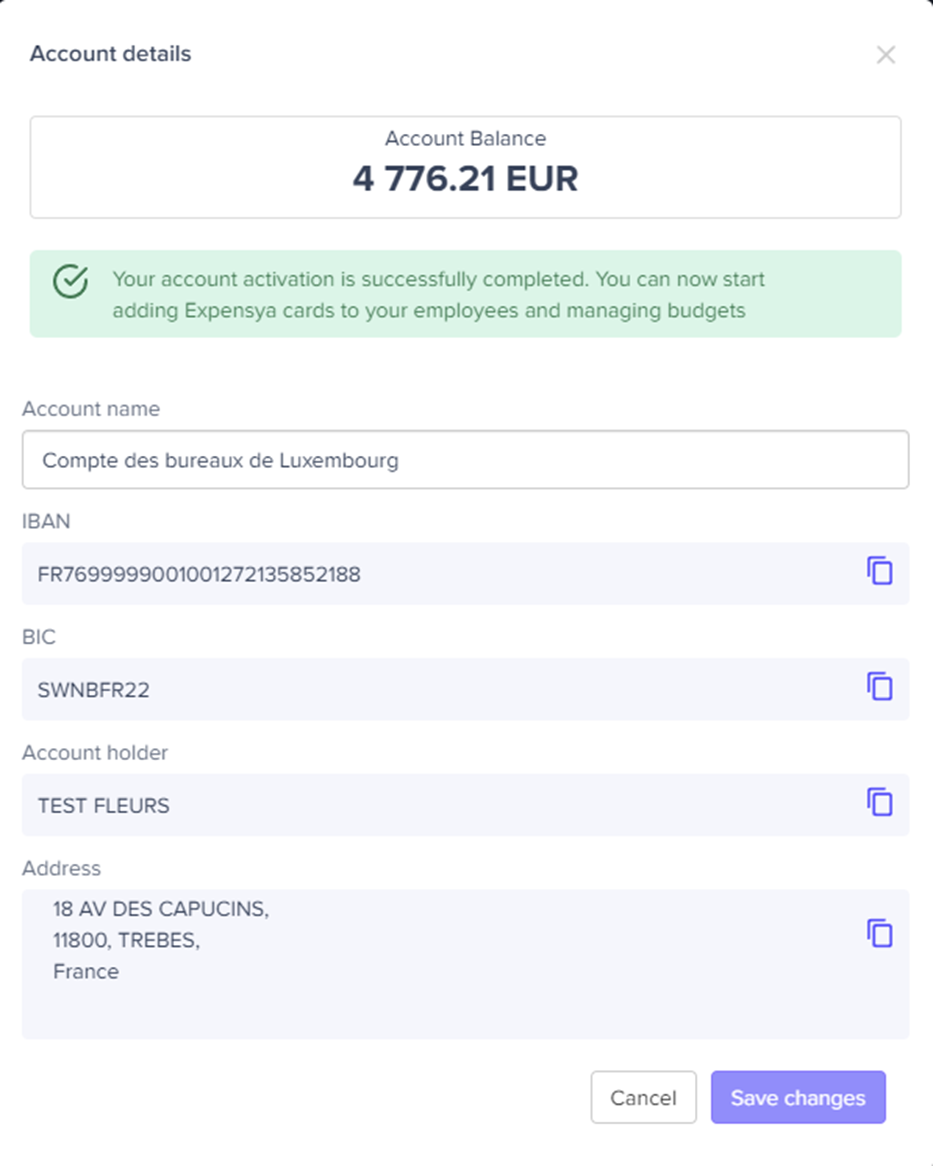
- Click on the account name to view details
The administrator then has the option of :
- Update the account name taking into account that it must be unique
- Copy the IBAN of the account
- Copy the BIC of the account
- Copy the account holder
- Copy the address of the account holder.
Was this article helpful?
That’s Great!
Thank you for your feedback
Sorry! We couldn't be helpful
Thank you for your feedback
Feedback sent
We appreciate your effort and will try to fix the article